


How to Deposit and Withdraw Crypto on WEEX? A Complete Guide On Networks, Fees and Limits
Moving crypto onto and off an exchange sounds simple, but a mismatched network or token can result in funds that are difficult or impossible to recover. This guide walks through how deposits and withdrawals actually work on WEEX, which networks are supported for common assets, what fees and minimums to expect, and the mistakes that most often cause a deposit to fail.
Fees, minimums, and supported networks are periodically updated by WEEX. The figures in this article reflect WEEX's published schedule at the time of writing — always confirm the current numbers on the official Rate Standards page before initiating a transfer.
How to Deposit Crypto on WEEX---Step By Step Guide
Step 1: Log In and Go to the Deposit Page
After logging into your account, go to Assets → Deposit → On-chain Deposit. This takes you to the deposit interface where you'll choose what to send.
Step 2: Select the Correct Token and Network
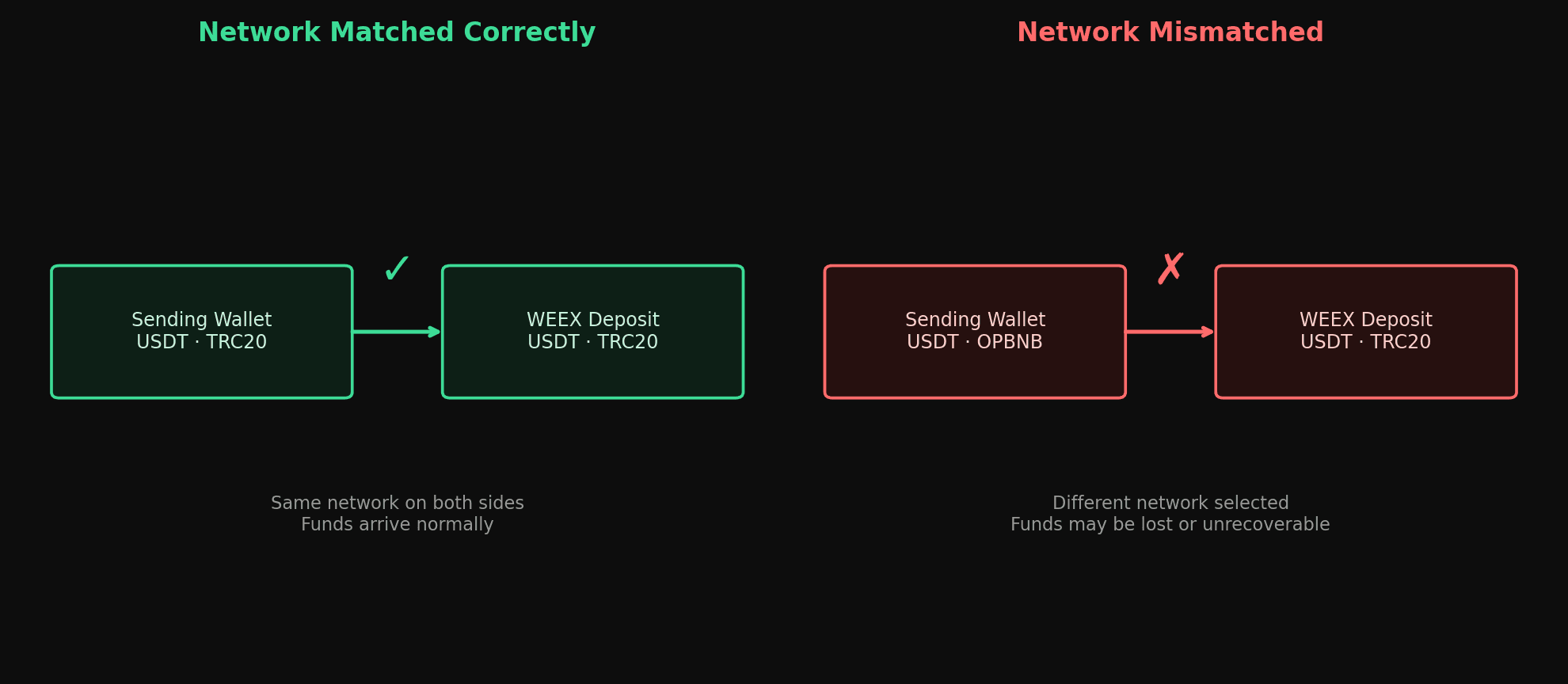
This is the step where most deposit errors happen. Many assets, especially stablecoins, exist on more than one blockchain network, and you must select the network on WEEX that matches the one you're sending from. For example:
- USDT is supported on WEEX via TRC20 (TRON), ERC20 (Ethereum), OP (Optimism), BEP20, and OMNI, each with different fees and processing speeds.
- BTC is only supported on its native Bitcoin network and BEP20 — no other network is accepted for BTC deposits.
If you send an asset on a network WEEX doesn't support for that token, or send it to a network different from the one selected in the deposit interface, the funds can be lost or require lengthy manual recovery — and in some cases recovery isn't possible at all.
Step 3: Copy the Deposit Address (or Scan the QR Code)
Once you've selected the correct token and network, WEEX generates a unique deposit address. Copy it exactly, or scan the QR code from your sending wallet or exchange, and double-check that the network selected on the sending side matches the one you chose on WEEX.
Step 4: Send the Funds and Wait for Confirmation
Initiate the transfer from your external wallet or exchange. Deposit processing time depends on blockchain conditions — most deposits are credited within minutes once the required network confirmations are complete, though congestion on networks like Bitcoin or Ethereum can extend this. You can track the status under Assets → History.
Some tokens also require a Tag or Memo (for example, XRP or EOS) — omitting this when required can cause the deposit to fail or be delayed, so double-check whether your asset needs one before sending.
Common Deposit Mistakes to Avoid
| Mistake | Result | How to Avoid It |
|---|---|---|
| Sending via a network WEEX doesn't support for that token | Funds may be lost or unrecoverable | Only use networks explicitly listed on the WEEX deposit page for that asset |
| Sending a different token to an address generated for another token | Deposit fails | Always match the token symbol to the address you're using |
| Omitting a required Tag/Memo | Deposit fails or is delayed | Check whether your asset requires a Tag/Memo before sending |
| Using an old or reused deposit address | Deposit may not be credited correctly | Always copy a fresh deposit address before each transaction |
WEEX does not charge a fee for depositing crypto, though minimums apply per asset (for example, TRC20/ERC20 USDT deposits below 1 USDT are not credited) and the sending network will charge its own transaction fee independent of WEEX.
How to Withdraw Crypto from WEEX
Step 1: Log In and Navigate to Withdraw
From your Spot Account, click Withdraw, or go to Wallet → Withdraw. This opens the withdrawal interface.
Step 2: Choose the Asset and Network
Select the token you want to withdraw (BTC, ETH, USDT, WXT, and others are supported). For multi-network assets like USDT, choose the network that matches the receiving wallet or exchange — sending to a mismatched network can result in lost funds, the same as with deposits.
Step 3: Enter the Withdrawal Address and Amount
Paste (don't retype) the destination address to avoid typos, and enter the amount you want to withdraw. Keep in mind that:
- Each asset has a minimum withdrawal amount.
- The network fee is deducted from the withdrawal, so the amount received will be slightly less than the amount requested.
Step 4: Confirm and Complete Security Verification
Review the address and amount carefully — once a withdrawal is confirmed, it cannot be cancelled. WEEX may require two-factor authentication (2FA) or other verification steps before the withdrawal is processed, depending on your account's security settings.
Step 5: Track Your Withdrawal
You can monitor withdrawal status under Withdrawal History. Processing time varies by network: USDT on TRC20 tends to settle faster, while BTC and ETH withdrawals may take longer during periods of network congestion.
Withdrawal Fees and Minimums
Unlike deposits, withdrawals to external wallets carry a network fee, which varies by asset and by which network you choose. A sample of the current published fees:
| Asset | Network | Withdrawal Fee | Min. Withdrawal |
|---|---|---|---|
| BTC | BTC | 0.00016 | 0.002 |
| ETH | ETH | 0.0015 | 0.01 |
| USDT | TRC20 | 1.5 | 10 |
| USDT | ERC20 | 3 | 20 |
| USDT | BEP20 | 0.8 | 5 |
| USDT | OMNI | 15 | 100 |
| LTC | LTC | 0.001 | 0.5 |
| BCH | BCH | 0.001 | 0.15 |
| BSV | BSV | 0.01 | 0.02 |
| QTUM | QTUM | 0.01 | 0.4 |
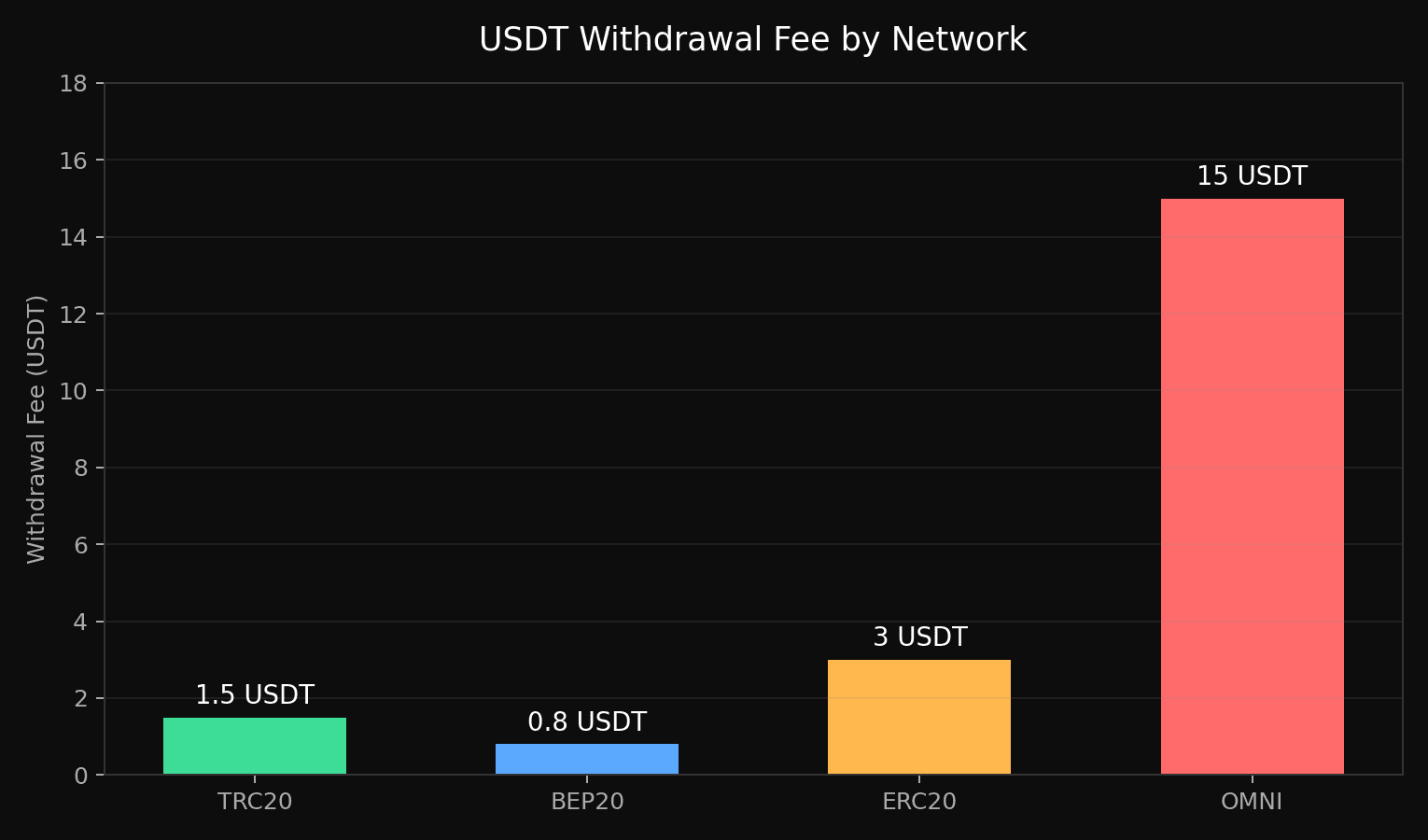
This is a partial list covering some of the most commonly withdrawn assets — the full schedule, covering every supported coin and network, is published on the Rate Standards page linked above. As a general rule, TRC20 tends to be the lower-fee option for USDT, while ERC20 and OMNI carry higher fees due to underlying network costs.
Tips for Smooth Deposits and Withdrawals
- Always double-check the network, not just the token symbol — the same coin can exist on several chains with different addresses.
- Send a small test amount first if you're moving a large sum to a new address or through a network you haven't used before.
- Keep transaction records (hash/ID) in case you need to follow up with support.
- Use the latest deposit address each time rather than reusing an old one from memory.
- Factor in network fees when withdrawing — the amount that arrives will be the requested amount minus the fee.
Where to Check the Latest Fees
Because withdrawal fees, minimums, and supported networks can change, the WEEX deposit guide and WEEX withdrawal guide cover the process in more detail, and WEEX's network and chain verification guide is worth reading in full before your first deposit if you want to avoid the most common chain-mismatch errors.
Final Thoughts
Deposits and withdrawals on WEEX follow a similar logic: match the token to the correct network, verify the address carefully, and account for any applicable fees before you transfer. WEEX doesn't charge deposit fees, and withdrawal fees are limited to the network cost of moving the asset. The single most important habit to build is double-checking the network selection every time — it's the step responsible for the vast majority of lost or delayed transfers on any exchange, not just WEEX.
WEEX does not offer services to users in the United States, its territories, or certain other restricted jurisdictions. Please review the Terms of Use for the current list of excluded jurisdictions and eligibility requirements before depositing or withdrawing funds.

Gainers


