


How to Trade Futures on WEEX? A Beginner's Guide to Orders, Leverage and Risk Management
Futures trading lets you speculate on the price of an asset using leverage, which means both potential gains and potential losses are amplified compared to spot trading. Before opening your first position on WEEX, it's worth understanding exactly how the order panel works, what leverage and margin actually do to your position, and what tools are available to manage risk. This guide walks through the process step by step.
Futures trading is a leveraged, high-risk activity and is not suitable for everyone. You can lose your entire deposit — and in some cases more than your deposit — in a short period of time. Nothing in this guide is investment advice; it's an explanation of how the WEEX interface and order types work, so you can make your own informed decisions.
Step 1: Open the Futures Trading Page
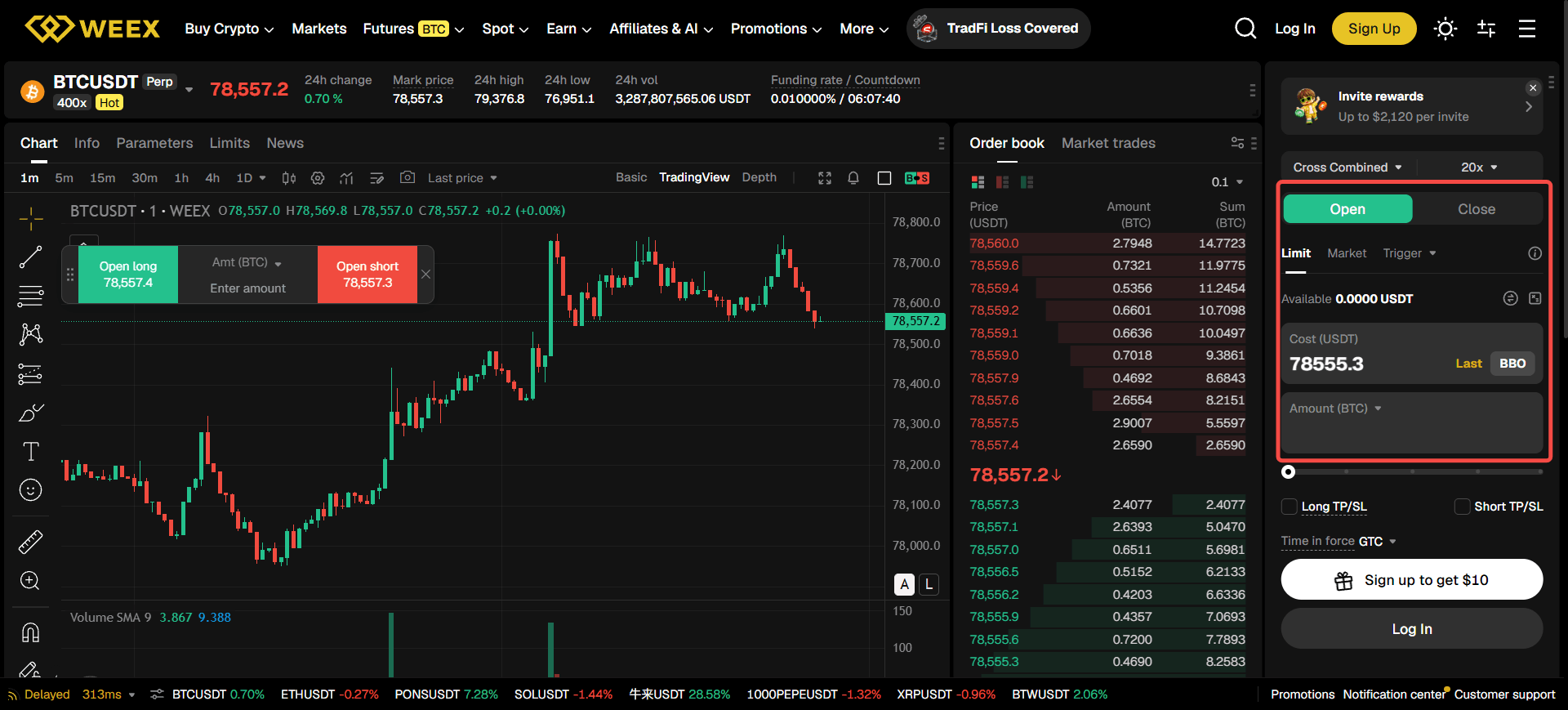
After logging into your WEEX account, go to the "Futures" section from the navigation bar and select USDT-M Futures — derivatives that are margined and settled in USDT, which is the format most traders start with.
Step 2: Choose a Trading Pair
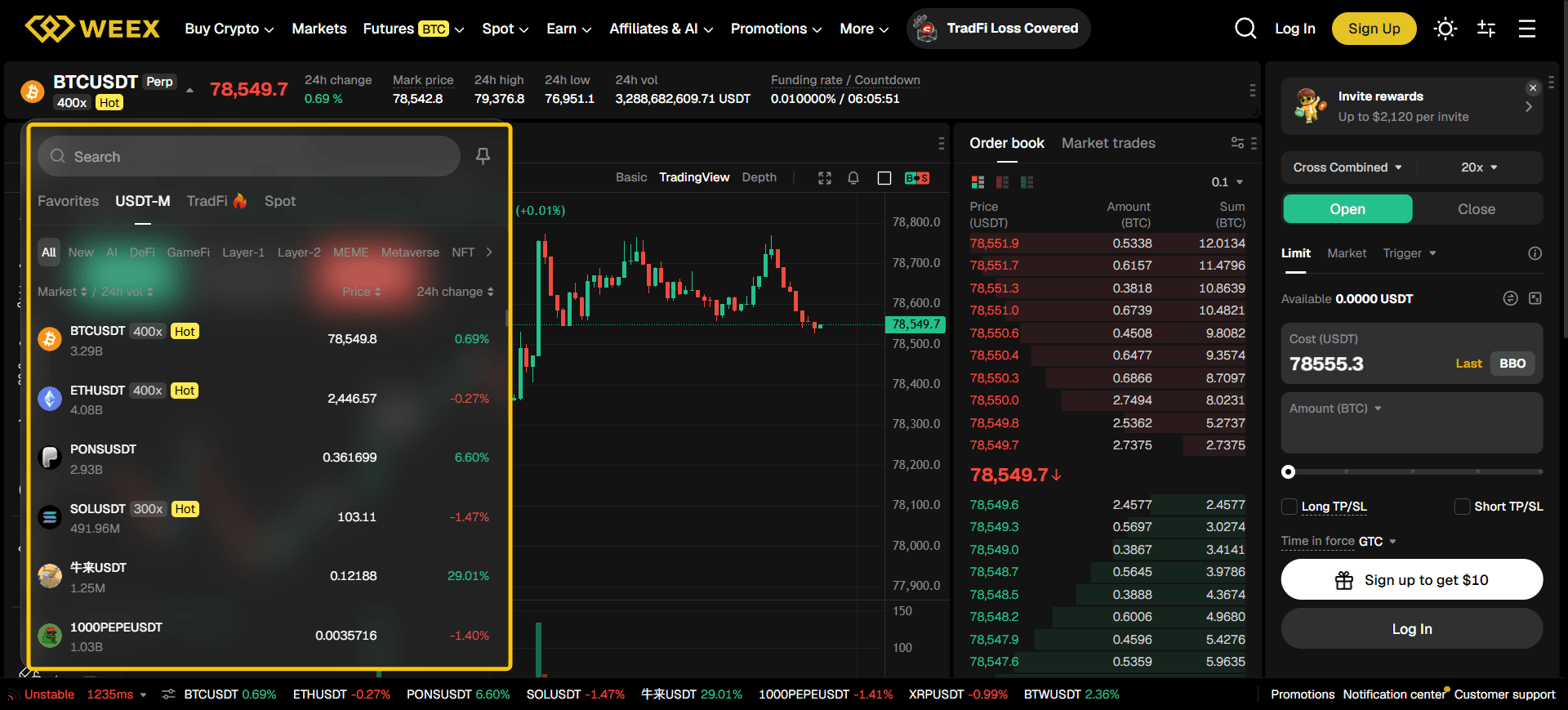
On the futures trading page, the trading pair selector (e.g., BTC/USDT) sits in the top-left corner, letting you switch between markets such as ETH, SOL, or BNB.
Step 3: Set Your Leverage
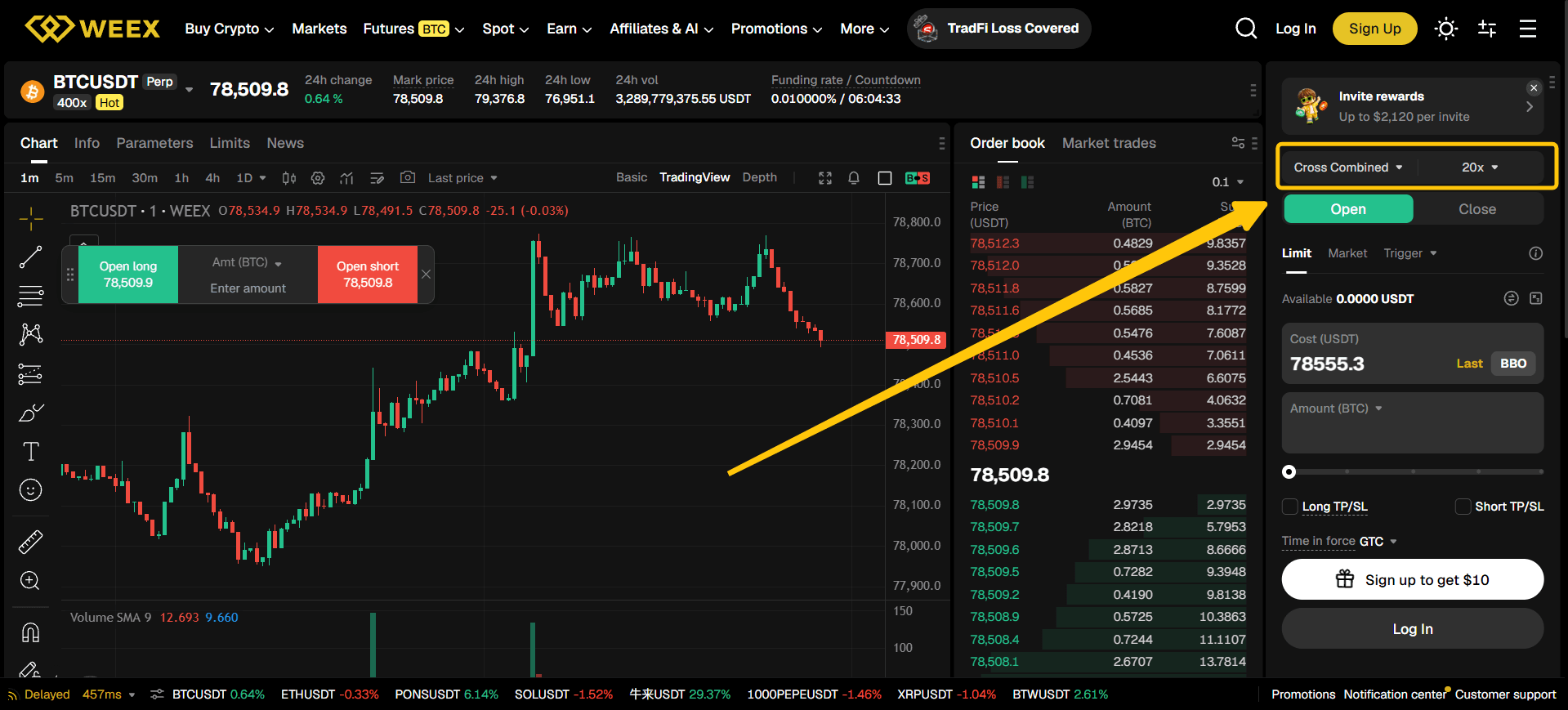
In the order panel, you'll find a leverage setting, typically defaulting to 10x or 20x. This is adjustable to your preferred level.
Higher leverage increases both potential profit and potential loss on the same price move. A 10x leveraged position moves roughly ten times faster — in either direction — than an unleveraged spot position of the same size. Beginners are generally advised to start with lower leverage (commonly 10x or below) until they're comfortable with how quickly a position's margin can be affected by price swings.
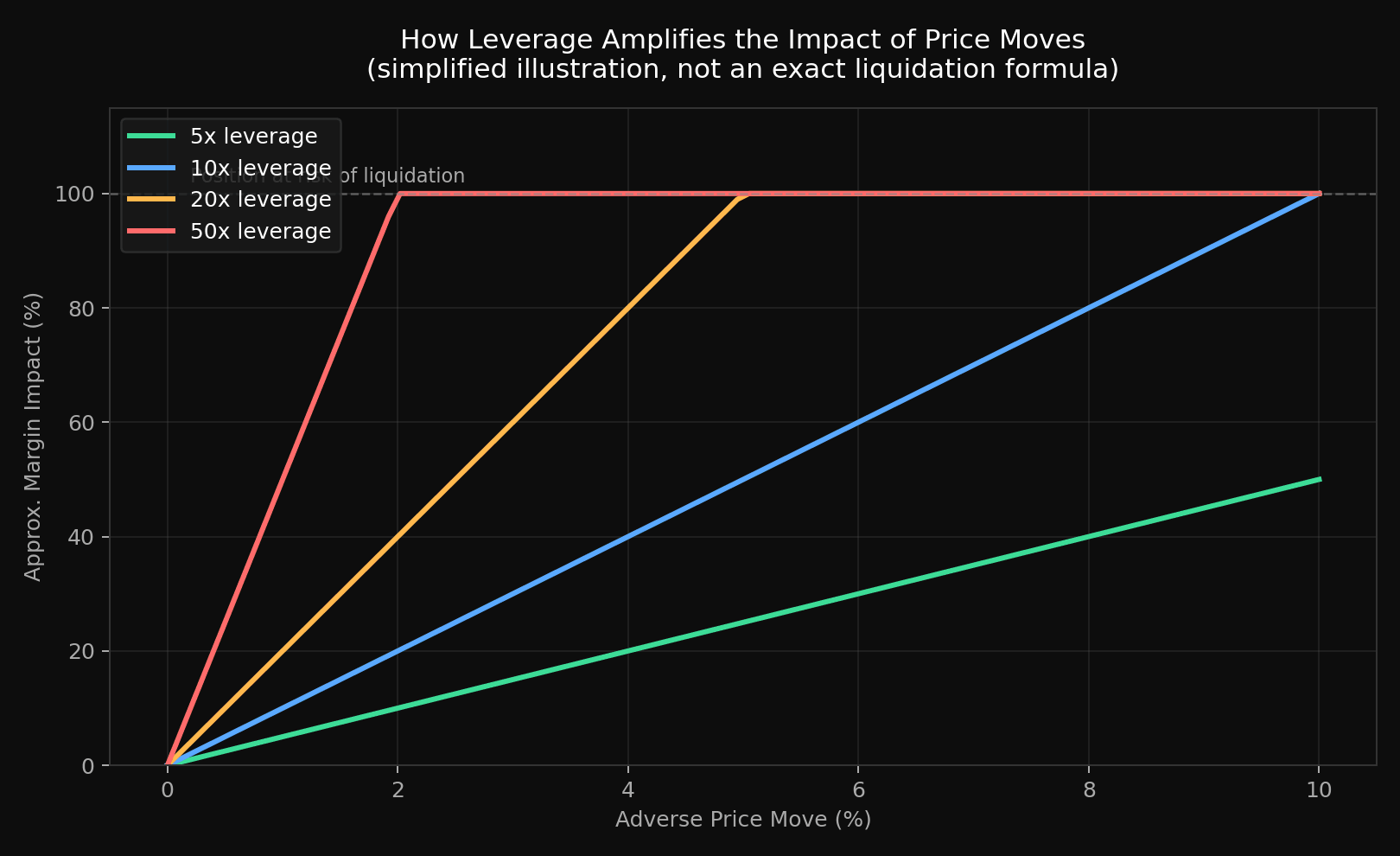
As the chart above illustrates, the higher the leverage, the smaller a price move is needed to significantly erode — or fully consume — your position's margin. This is a simplified illustration rather than WEEX's exact liquidation formula, which also accounts for mark price and maintenance margin requirements, but the underlying principle holds: leverage cuts both ways, and higher leverage shrinks your margin for error.
Step 4: Choose a Margin Mode — Cross or Isolated
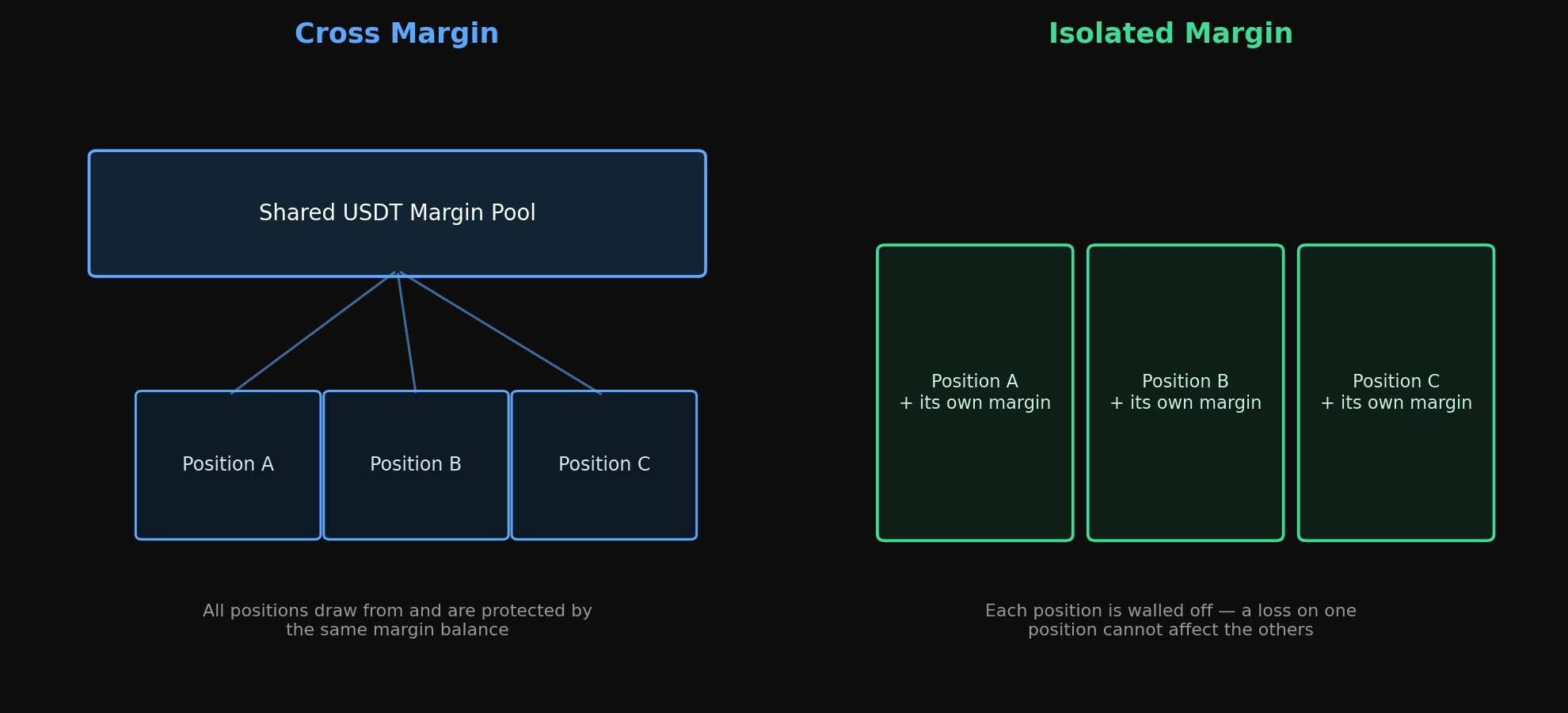
Next to the leverage setting, you'll choose between two margin modes:
| Mode | How It Works | Best For |
|---|---|---|
| Cross Margin | All available USDT in your futures account is shared as margin across open positions. This can offer more resistance against liquidation on any single position, but a liquidation event can affect your entire futures balance. | Traders with more experience managing multiple positions |
| Isolated Margin | Each position uses only the margin you've specifically assigned to it. Losses are contained to that position and won't touch the rest of your futures balance. | Beginners, and anyone who wants to cap risk per trade |
For newer traders, isolated margin is generally the more conservative starting point, since it puts a hard ceiling on how much any single position can cost you.
Step 5–8: The Four Main Order Types
WEEX's futures order panel supports four order types, each suited to a different trading approach.
Market Orders
A market order executes immediately at the best available price. Select "Market," enter your size (or use the percentage slider), then choose "Open Long" or "Open Short" to confirm.
- Pros: Instant execution, high fill rate — useful for fast entries or exits.
- Cons: During high volatility, the executed price can differ from the displayed price due to slippage.
Limit Orders
A limit order lets you set a target price. The order only fills once the market reaches that level. Select "Limit," enter your target price and size, then submit.
- Pros: Lets you plan entries at a specific price, and limit orders that add liquidity may qualify for maker fee rates.
- Cons: The order won't execute unless the market actually reaches your price, and once triggered, execution still occurs at the prevailing market price, so some slippage is possible. An order that never reaches your target will stay open until you cancel it.
Trigger Orders
A trigger order is conditional: you set a trigger price, and once the market reaches it, WEEX automatically submits an order (as either a market or limit order) on your behalf. Before the trigger price is reached, the order stays hidden from the order book.
For example, if BTC is trading at 94,000 USDT and you believe a break above 96,000 USDT confirms further upside, you could set a trigger price of 96,000 USDT with a market-buy order attached — the long position opens automatically once that level is hit.
According to WEEX's trigger order documentation, trigger orders may not execute successfully in certain conditions, including price limits, order quantity limits, position limits, insufficient margin, or network/system issues — so they should be monitored rather than treated as a guaranteed fill.
- Pros: No need to watch the market constantly; useful for both breakout entries and stop-loss protection.
- Cons: If configured to trigger a market order, slippage can occur; if configured for a limit order, it may not fill during fast-moving conditions.
Trailing Stop Orders
A trailing stop order dynamically follows price movement. After setting a callback percentage, the trigger price adjusts along with the market as it moves in your favor. If the market reverses by the set percentage, the position closes automatically.
Example: you're long BTC from 90,000 USDT, and price has risen to 96,000 USDT. With a 3% callback rate, if BTC continues to 98,000 USDT, the trigger level moves up to roughly 95,060 USDT (98,000 × (1 − 3%)). If price then pulls back to that level, the position closes, locking in the move up to that point. If price keeps climbing, the trigger level keeps trailing higher.
- Pros: Can help capture more of a trend without manually adjusting exit levels.
- Cons: In choppy, sideways markets, trailing stops can trigger more frequently than intended; a callback rate set too tight may close a position prematurely, while one set too wide allows for a larger pullback before exiting.
Quick Comparison of Order Types
| Order Type | Executes | Best For | Key Risk |
|---|---|---|---|
| Market | Immediately, at current price | Fast entries/exits | Slippage in volatile conditions |
| Limit | At your set price, once reached | Planned entries | May never fill |
| Trigger | Automatically, once trigger price hit | Breakouts, stop-losses | May not execute due to margin/liquidity/system limits |
| Trailing Stop | Automatically, on a set reversal % | Locking in trend profits | Frequent triggers in choppy markets |
Step 9: Monitor and Close Your Position
Once filled, your position appears under the "Positions" tab, showing entry price, current mark price, unrealized P/L, estimated liquidation price, and margin used. To exit, use "Close," choosing either a market close or a limit close order.
Setting a stop-loss and take-profit at the same time you open a position is a commonly recommended practice for managing downside risk and reducing the need to actively watch the market.
Understanding Funding Rates
If you hold a perpetual futures position on WEEX, you'll also encounter the funding rate — a mechanism separate from trading fees. Per WEEX's funding rate documentation, funding is settled every 8 hours (00:00, 08:00, and 16:00 UTC+8) and is a direct transfer between long and short position holders based on the gap between the perpetual contract price and the underlying spot index — WEEX does not collect or profit from it. Depending on which side of the market you're on, you may pay or receive funding at each interval, so it's worth factoring into the cost of holding a position open across multiple funding times.
Understanding Liquidation
Every leveraged position has a liquidation price — the price at which your position is automatically closed because your margin can no longer support it. If the market moves against your position and your margin balance falls toward the required maintenance margin, WEEX will begin closing the position to prevent the balance from going further negative. This is why monitoring your position (or setting alerts) matters more the higher your leverage is: higher leverage means a smaller adverse price move is needed to reach the liquidation price.
Isolated margin limits what a liquidation can take from you to the margin assigned to that specific position; cross margin means a liquidation event draws on your full futures balance, which is one reason it requires closer monitoring.
Trading Fees on Futures
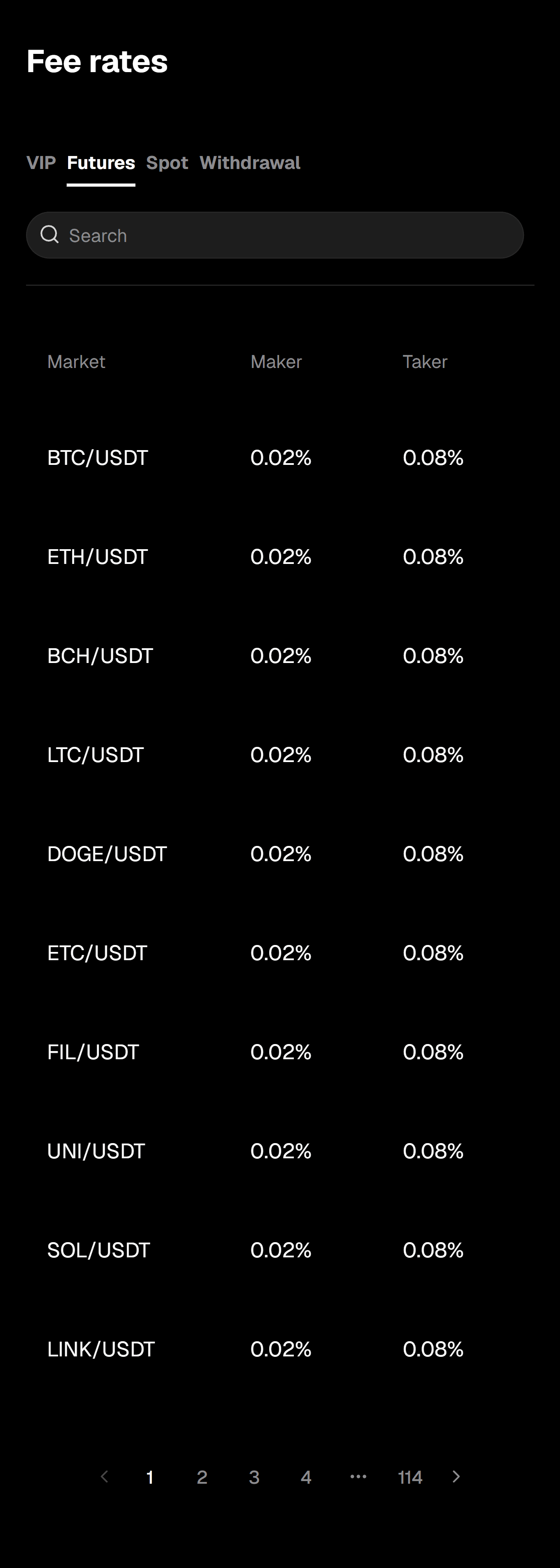
Every futures trade incurs a maker or taker fee when a position is opened, closed, or reduced — fees are not charged on unfilled or cancelled orders. Fees are calculated on position value (not leverage), using the formula: entry price × contract value × quantity × maker or taker rate.
At the base tier (VIP 0), the standard rate is 0.02% for makers and 0.08% for takers. As your 30-day futures volume, WXT balance, or account asset value increase, you move up VIP tiers and both rates drop:
| VIP Level | 30d Futures Vol. (USDT) ≥ | 1d WXT Balance ≥ | 5d Asset Value (USDT) ≥ | Maker | Taker |
|---|---|---|---|---|---|
| VIP 0 | 0 | 0 | 0 | 0.020% | 0.080% |
| VIP 1 | 1,000,000 | 5,000 | 10,000 | 0.020% | 0.075% |
| VIP 2 | 5,000,000 | 50,000 | 30,000 | 0.018% | 0.060% |
| VIP 3 | 10,000,000 | 250,000 | 50,000 | 0.018% | 0.055% |
| VIP 4 | 30,000,000 | 500,000 | 100,000 | 0.016% | 0.050% |
| VIP 5 | 50,000,000 | 1,000,000 | 200,000 | 0.016% | 0.048% |
| VIP 6 | 100,000,000 | 1,500,000 | 300,000 | 0.014% | 0.045% |
| VIP 7 | 300,000,000 | 2,500,000 | 500,000 | 0.012% | 0.042% |
| VIP 8 | 500,000,000 | 3,500,000 | 1,000,000 | 0.010% | 0.040% |
Requirements are "meet any" — satisfying just one of the three criteria (volume, WXT balance, or asset value) is enough to qualify for a tier. A limit order that adds liquidity to the book is generally charged the lower maker rate, while market orders and any order that fills immediately are charged the taker rate — which is one reason some traders default to limit orders when they aren't in a hurry to enter a position.
These figures reflect WEEX's published fee schedule at the time of writing. Rates and VIP thresholds can be updated by WEEX at any time, so always confirm the current numbers on the official Rate Standards page before trading.
Risk Management Checklist
A few practices that align with how WEEX's own Futures Trading Terms of Use describe responsible use of leverage:
- Only trade with funds you can afford to lose. Futures trading can result in losses that exceed your original deposit.
- Start with lower leverage until you're comfortable with how quickly margin requirements change with price movement.
- Use isolated margin if you want to cap the maximum loss on any individual position.
- Set stop-loss and take-profit levels at the time you open a position, rather than deciding reactively during a fast market move.
- Monitor open positions actively, particularly during periods of high volatility, since liquidations can happen quickly and without further notice once triggered.
- Understand funding rates if you're holding perpetual positions across multiple funding intervals, since they add to (or subtract from) your position's running cost.
Final Thoughts
WEEX's futures order panel gives traders four distinct order types — market, limit, trigger, and trailing stop — each suited to a different way of entering or exiting a position, along with a choice between cross and isolated margin for controlling how liquidation risk is contained. Used carefully, these tools help structure a trading plan; used carelessly, leverage can just as easily accelerate losses as gains.
Futures trading involves substantial risk and is not appropriate for every investor. Before trading, make sure you fully understand how leverage, margin, and liquidation work, and consider your own risk tolerance and financial situation — independent financial advice is worth seeking if you're unsure. You can find the complete step-by-step walkthrough, including screenshots of the WEEX interface, in the official how-to-trade guide, and learn more about the platform on the about WEEX page.
WEEX does not offer services to users in the United States, its territories, or certain other restricted jurisdictions. Please review the Terms of Use for the current list of excluded jurisdictions and eligibility requirements before trading futures.

Gainers


